Rebuilding e11y.com: A Deep Dive Into Migrating From Webflow to Hammer + Forge
Webflow has been a great tool for me over the years, but there’s something incredibly satisfying about taking a site out of a proprietary system and bringing it fully into my own stack, powered by  Hammer,
  Forge, and supported by Cursor.
My latest rebuild was e11y.com, a category site for extensibility-first design (E11Y). It’s a living knowledge base focused on extensibility-driven architecture, product design, and ecosystem-led growth. It also celebrates the platforms, tools, and plugin developers who make extensibility possible.
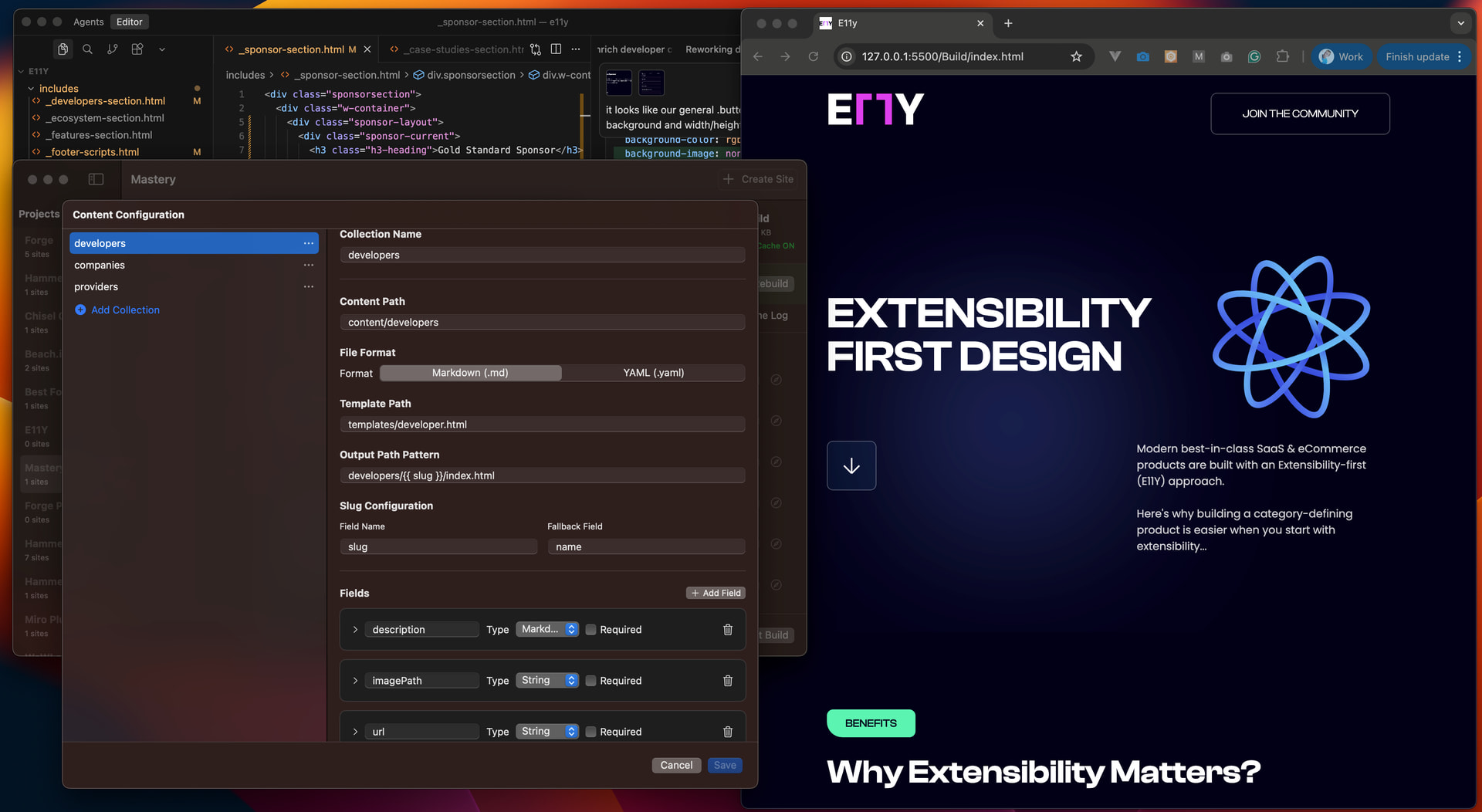
This post walks through exactly how I migrated the original Webflow site into a fully static, Hammer-powered site with a clean CMS structure, tidy asset library, and smooth CI/CD deployment via Forge.
1. Extracting the Webflow site
Rather than using Webflow’s export, I used SiteSucker to pull down the entire site.
Why?
Because Webflow’s CMS export is limited, I ran into issues with missing content, odd behaviours, and restrictions around exporting CMS-backed pages. SiteSucker gave me a complete, faithful snapshot of everything.
I dropped that downloaded folder straight into a new Hammer project (after merging the assets download with the source html).
2. Refactoring everything into Hammer syntax with Cursor
Once the files were in place, I enlisted Cursor. Because Hammer automatically generates Cursor Rules, Cursor knows exactly how Hammer tags, paths, pages, and content structures work.
This meant the refactor was surprisingly seamless:
- Replace Webflow’s sprawling, div-heavy structure with clean Hammer tag syntax
- Convert layouts into Hammer’s partials and page templates
- Strip out inline styling and Webflow artifacts
- Normalize the HTML so it was easier to maintain
It felt more like pair-programming with an expert who already understood Hammer inside-out.
3. Cleaning up assets and paths
Webflow’s exported assets… are not pretty.
- Long hashed filenames
- Nested, inconsistent folder structures
- Lottie JSON files scattered everywhere
- Images named things like “image-239482934823.svg”
Using Hammer, I reorganized everything into a sane structure:
/assets
  /images
  /lottie
  /css
  /js
One of Hammer’s underrated superpowers is clever path resolution.
I could reference assets in my templates using only:
<!-- @path logo.png -->
And Hammer automatically finds the correct file across the directory structure. This made the cleanup painless, I just renamed assets, dropped them where they belonged, and Hammer handled the rest.
4. Setting up the CMS using Hammer’s new Content feature
Next, I enabled Content Mode in the Hammer site settings.
For e11y.com, I needed three collections. Within minutes, I:
- Created each collection
- Added the necessary fields
- Generated a detail template for each item type
- Built the listing pages using Hammer’s tag system
- Conditional checks
- Loops
- Content references
- Template partials
Hammer instantly made the site feel like a proper CMS-driven project, except without the hosting limitations or runtime complexity of Webflow. All running locally on my machine.
<div class="w-dyn-list">
   <div role="list" class="providers-collection-list w-dyn-items">
     <!-- @loop provider in collections.providers -->
      <div role="listitem" class="w-dyn-item">
          <div class="card-wrapper">
              <a href="providers/<!-- $provider.slug -->/" class="card-header w-inline-block">
                  <!-- @if provider.imagePath -->
                  <img src="<!-- $provider.imagePath -->" loading="lazy" alt="<!-- $provider.name -->" class="card-img">
                  <!-- @else -->
                  <img src="<!-- @path assets/img/developer-placeholder.jpeg -->" loading="lazy" alt="<!-- $provider.name -->" class="card-img">
                  <!-- @endif -->
              </a>
              <div class="card-body">
                  <div class="card-title-paragraph-wrapper">
                      <div class="card-title-wrapper">
                          <h3 class="card-title"><!-- $provider.name --></h3>
                          <a href="providers/<!-- $provider.slug -->/" class="link-wrapper-box w-inline-block">
                              <img src="<!-- @path assets/svg/63cec55c25d0e674f606a1af_link.svg -->" loading="lazy" alt="" />
                          </a>
                      </div>
                      <!-- @if provider.description -->
                      <p class="card-paragraph"><!-- $provider.description --></p>
                      <!-- @endif -->
                  </div>
                  <!-- @if provider.tags -->
                  <div class="w-dyn-list">
                      <div role="list" class="w-dyn-items">
                          <!-- @if provider.tags[0] -->
                          <div role="listitem" class="w-dyn-item">
                              <div style="background-color:hsla(214, 100.00%, 76.34%, 1.00)" class="card-tag">
                                  <!-- $provider.tags[0] -->
                              </div>
                          </div>
                          <!-- @endif -->
                          <!-- @if provider.tags[1] -->
                          <div role="listitem" class="w-dyn-item">
                              <div style="background-color:hsla(214, 100.00%, 76.34%, 1.00)" class="card-tag">
                                  <!-- $provider.tags[1] -->
                              </div>
                          </div>
                          <!-- @endif -->
                          <!-- @if provider.tags[2] -->
                          <div role="listitem" class="w-dyn-item">
                              <div style="background-color:hsla(214, 100.00%, 76.34%, 1.00)" class="card-tag">
                                  <!-- $provider.tags[2] -->
                              </div>
                          </div>
                          <!-- @endif -->
                          <!-- @if provider.tags[3] -->
                          <div role="listitem" class="w-dyn-item">
                              <div style="background-color:hsla(214, 100.00%, 76.34%, 1.00)" class="card-tag">
                                  <!-- $provider.tags[3] -->
                              </div>
                          </div>
                          <!-- @endif -->
                          <!-- @if provider.tags[4] -->
                          <div role="listitem" class="w-dyn-item">
                              <div style="background-color:hsla(214, 100.00%, 76.34%, 1.00)" class="card-tag">
                                  <!-- $provider.tags[4] -->
                              </div>
                          </div>
                          <!-- @endif -->
                      </div>
                  </div>
                  <!-- @endif -->
              </div>
          </div>
      </div>
      <!-- @endloop -->
  </div>
  </div>
There’s a bug I found in Hammer with nested loops, hence why I’m referencing tags with index for now.
5. Authoring with Markdown
With collections ready, I started creating content in the simplest way possible:
Markdown files.
Each collection has its own folder:
/content/developers
/content/companies
/content/providers
Inside each, I added .md files containing the frontmatter fields and body copy. Hammer does the rest:
---
slug: stripe
name: Stripe
imagePath: assets/img/stripe-screen.png
url: https://stripe.com
documentationLink: https://stripe.com/docs/building-extensions
---
- It builds each collection
- Generates static pages
- Injects content into templates
- Enables previews
- Handles relationships and conditions
This was the moment the site started to feel alive again.
6. Deploying with Forge
Once everything was in place, it was time to go live.
I created a new site in Forge, linked it to my Hammer site and clicked “deploy to Forge”… and deployed to production in seconds. Forge handled:
- Static build
- Asset upload
- Deployment across the CDN
- Automatic versioning
- Environment controls
No lock-in. No surprises. And full control of my files and infrastructure again.
7. What’s next
Now that e11y.com is powered by Hammer + Forge, I’m supercharged for ongoing development. I can:
- Move fast without restrictions
- Add new collections anytime
- Extend layouts or tags without fighting a visual editor
- Experiment with agentic content workflows in Cursor
- Deploy confidently with Git-based workflows
- Keep assets organised and sane
- Grow the knowledge base continuously
This rebuild took far less time than I expected, and the result is a site that’s cleaner, faster, more maintainable, and fully part of my ecosystem.
Nearly done.